
Understanding the Importance of Good Posture When Using a Laptop
Common Posture-Related Issues for Laptop Users
Imagine Sarah, a marketing professional who spends hours each day working on her laptop from different spots around her home. Over time, she begins to notice stiffness in her neck and shoulders, alongside occasional headaches. This scenario is common among laptop users who often find themselves slouching or craning their necks to see the screen better. These habits can lead to tension headaches, neck pain, and even long-term spinal issues if left unaddressed. Many laptop users adopt a forward head posture, unconsciously leaning into the screen, which stresses muscles and joints and contributes to discomfort.
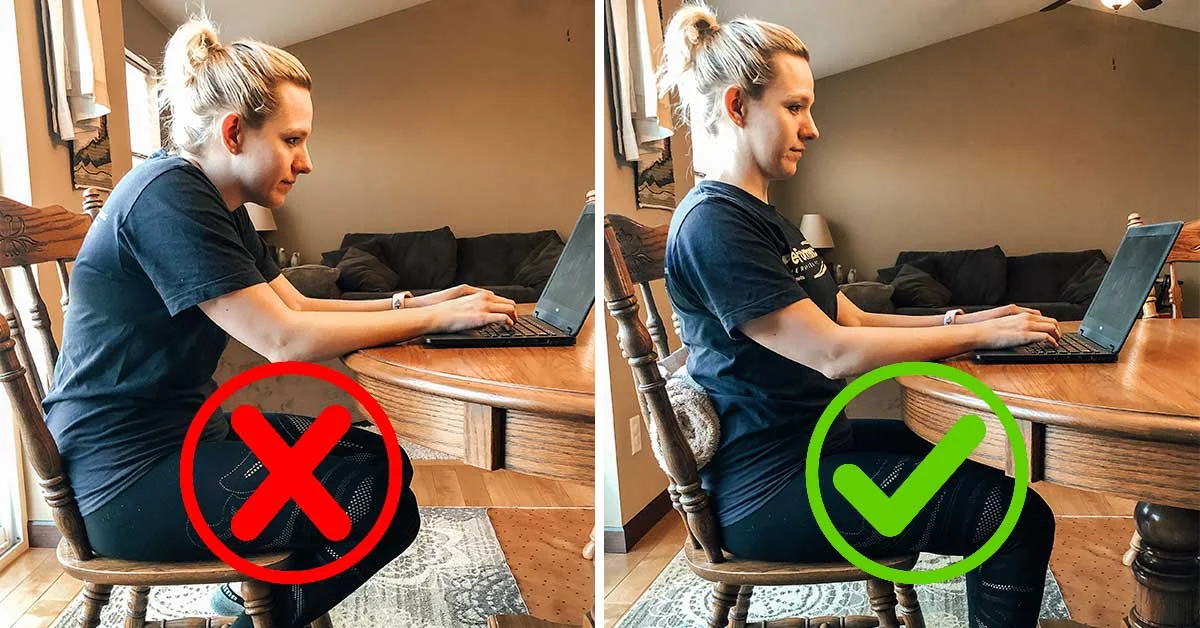
How Poor Posture Affects Your Health and Productivity
Poor posture doesn’t just cause physical discomfort—it can also impact how productive you feel during your workday. When John, a freelance writer, started experiencing upper back pain from poor laptop setup, he realized his focus was frequently broken by the ache, reducing his efficiency. Research shows that maintaining an awkward posture can reduce circulation and increase fatigue, leading to less concentration and lower work quality. Additionally, ongoing bad posture habits may escalate into chronic problems that interfere with daily activities beyond work, underscoring the importance of correcting posture early.
Setting Up an Ergonomic Laptop Workspace
Choosing the Right Chair and Desk
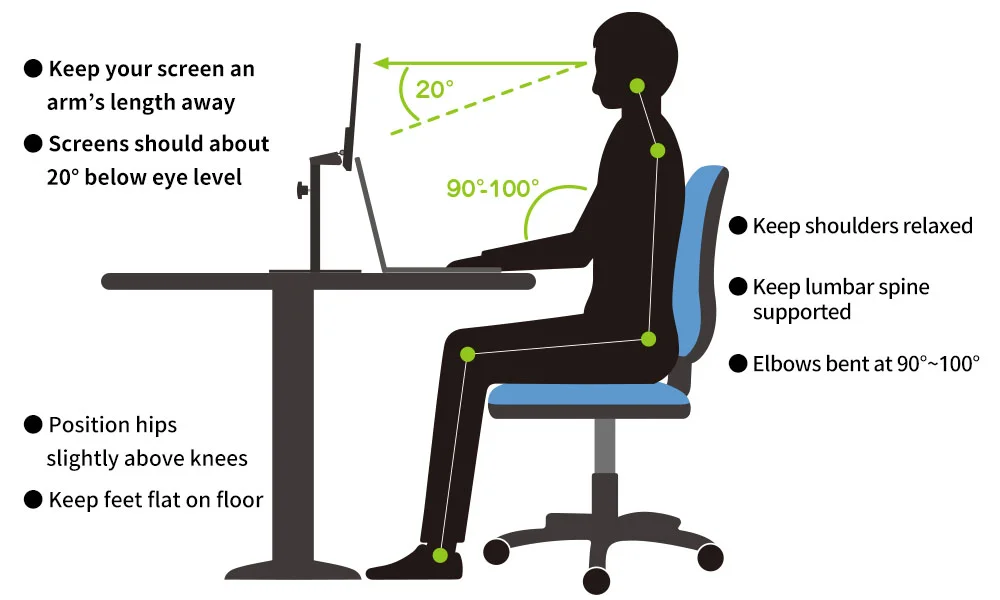
One Saturday morning, Emma decided to revamp her home office after noticing recurring lower back pain. She invested in an adjustable chair with lumbar support and paired it with a desk at the right height, where her elbows could bend naturally at 90 degrees. A chair that supports the natural curve of the spine and allows feet to rest flat on the floor is essential. Equally important is the desk height; too high or too low forces awkward arm and shoulder positions that can strain muscles.
Positioning Your Laptop for Optimal Alignment
Mark, an engineer working remotely, found that placing his laptop flat on the desk caused him to look down constantly, which led to a sore neck. He solved this by using a laptop stand to raise the screen to eye level. Keeping the screen at eye height encourages a straight back and reduces neck bending. The keyboard and mouse can be positioned separately at a comfortable height to maintain neutral wrist positions. This setup promotes alignment where the head sits over the shoulders and the shoulders remain relaxed.
Recommended Accessories to Enhance Posture
Using the right accessories can make a huge difference. A separate external keyboard and mouse allow you to position input devices at a comfortable height while your screen remains elevated. For those spending long hours seated, a footrest can promote better posture by supporting the feet when the desk height isn’t adjustable. Anti-glare screen protectors and adjustable monitors may also reduce eye strain and encourage proper alignment by minimizing the need to lean forward toward the screen.
Daily Posture Practices for Laptop Users
Step 1: Adjust Your Sitting Position
At the start of each work session, take a moment to settle into your chair properly. Lydia, a graphic designer, learned to sit back against her chair with her lower back supported, keeping her feet flat on the ground. It’s vital to avoid crossing legs for extended periods, which can tilt the pelvis and cause imbalance. Keeping hips and knees at roughly 90-degree angles establishes a stable and supportive position.
Step 2: Align Your Screen to Eye Level
Alex discovered that by lifting his laptop screen using books when working from cafes, he could keep his head upright rather than leaning forward. Positioning the top of the screen at or just below eye level allows the eyes to gaze slightly downward, reducing neck strain. Adjusting screen brightness and contrast also helps minimize squinting and leaning forward to see clearly.
Step 3: Maintain Proper Hand and Wrist Placement
One practical change Mia made was to ensure her wrists hovered comfortably over the keyboard without bending up or down. She kept her wrists neutral, aligning with forearms, to avoid unnecessary strain. A wrist rest or padded mouse pad can help maintain this neutral position but should be used carefully to avoid pressure points. Typing with relaxed hands prevents fatigue and discomfort in the forearms and wrists.
Step 4: Use Reminders and Apps to Stay Correct
Many people, like David, benefit from posture reminder apps that prompt them to check their alignment every 30 minutes. Timers, alarms, or even sticky notes placed in your work area can serve as good cues to adjust and refocus on posture. These subtle nudges help build awareness and maintain good habits even during busy or demanding work periods.
Incorporating Movement and Stretching Into Your Work Routine
Simple Desk Stretches to Relieve Tension
Rachel, a software developer, incorporates short stretches between tasks to relieve tightness. For example, rolling the shoulders backward and forward, gently tilting the neck side to side, or stretching arms overhead can ease upper body tension. Even a few minutes of these simple movements can counteract the stiffening effects of sitting in one position.
The Importance of Taking Regular Breaks
Tim, an accountant, noticed that when he worked non-stop for hours, his posture would worsen and aches would become more pronounced. By scheduling a 5-minute break every hour to stand, walk, or perform light stretching, he stays more comfortable and alert. Regular breaks help the body reset and encourage dynamic sitting rather than static postures that stress muscles and joints.
Posture Correction Tips for Long Laptop Sessions
How to Notice When Your Posture is Slipping
During long work sessions, it’s common for posture to deteriorate without realizing it. Subtle signs like neck stiffness, shoulder rounding, or a creeping slouch can indicate misalignment. John keeps a small mirror on his desk to glance at posture or asks a colleague to observe his sitting position during video calls. Developing this awareness prevents small problems from becoming painful habits.
Quick Fixes to Improve Posture on the Go
When traveling or working in less ergonomic environments, simple adjustments can help. For instance, placing a rolled-up towel behind the lower back, resting feet flat on the floor or low stool, and using stands or cushions to elevate the laptop can promote better posture. Even small tweaks can reduce discomfort during those unavoidable long stretches of laptop use away from home.
Long-Term Benefits of Maintaining Proper Laptop Posture
Enhanced Comfort and Reduced Pain
With consistent attention to posture like Maya’s, who made changes to her workspace and habits, discomfort diminishes over time. Proper alignment reduces strain on muscles and joints, often easing chronic neck, shoulder, or back pain. Over months and years, this contributes to better overall physical comfort and fewer work interruptions caused by pain.
Improved Focus and Productivity
Beyond physical benefits, good posture supports mental clarity. When you’re not distracted by aches or fatigue, you can concentrate more effectively. People like Daniel, a remote consultant, report feeling more energized and productive when maintaining ergonomic setups. Being comfortable fosters a positive work experience and helps sustain longer periods of effective laptop use.


